Error uploading or using mic - NOTHING WORKS.

Using the microphone or uploading an mp3 file to change the voice doesn't work no matter what I try. I always get an "error uploading your file" message. I'm getting a little fed up of the bugs now I'm paying for the pro version :-(
My vpn is off so it's not that or DNS settings either.
It was ok yesterday, raspy voice issues the day before and now this! Seriously considering cancelling my subscription now.
-
OK after further testing it appears to be an issue with the length of the voice clip. It's maximum length has been reduced from 5 minutes to 1 minute. Can this be resolved please? 1 minute clips are really difficult for me to work with.
0 -

the same issue is here I can't upload any file even though I tried many times, and restarted my p.c. changed my internet connection noting it's helps
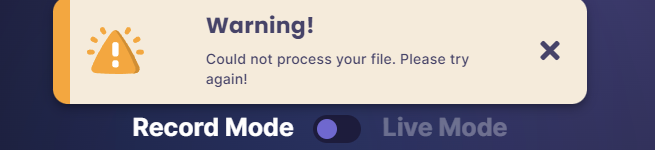 1
1 -
Yes, it does the same with all voices too, but I've also found it works with clips under 1 minute. I suspect they've reduced the maximum clip length. If i didn’t need the program as much as i do I'd cancel my subscription until they sort all the bugs - the longer length of clip uploads was one of the main reasons i subscribed to pro beta 😠
0 -

Rich Harvey I just tried to reproduce your issue on an account with an active subscription. I tried uploading several audio files for conversion that were 5 minutes or less in length, wav or mp3 format, and the problem was not detected.
Try uninstalling voice.ai from your PC and uninstalling the voice.ai drivers as well, and then reinstall the application0 -
Waseem Naseem I also advise you to do this and it would be great if you could write back if it helped solve your problem
0 -
Seems like the issue has resolved itself for now. It did a download and now cleared the problem.
0 -
It's not working again and an uninstall/reinstall doesn't work - please sort this!!!
0
Please sign in to leave a comment.
Comments
7 comments