Voice Is Distorted - Looking to Enable Hardware Acceleration

I have a laptop running the latest version of Windows 11 with the configuration below. When I attempt to use voice.ai in Zoom, I keep getting asked to turn on hardware acceleration and the voice output is very distorted no matter where I set the quality number. Can you please let me know how to turn on acceleration?
Processor 11th Gen Intel(R) Core(TM) i9-11980HK @ 2.60GHz, 3302 Mhz, 8 Core(s), 16 Logical Processor(s)
Installed Physical Memory (RAM) 64.0 GB
Intel(r) UHD GPU 32GB
NVIDIA GeForce RTX 3060 Laptop GPU 38GB
-
Official comment

Hello there,
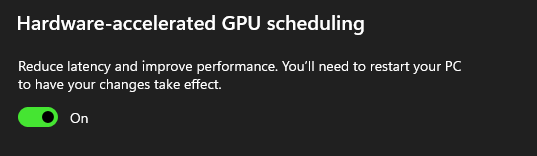
Navigate to Graphics Settings in Windows > Change Default Graphics > Toggle On Hardware/accelerated GPU scheduling.
If your issue persists, please let us know and we will look into it further.
Please sign in to leave a comment.
Comments
1 comment