0.1.26 update will not output audio (FIXED)

With the new 0.1.26 update, I can hear myself in the app only, will not output audio anywhere else, STEAM specifically, also windows voice recorder no longer works either. I had it working fine until it updated the software today. I followed the directions to set up for steam I've had it working before. Also used to be able to "listen" to it in the windows sound control panel.
Going to update GeForce drivers and see if that fixes it.
-
Updated the GeForce drivers 528.49 2/8/23
No changes0 -

We are looking into this issue, could you do the following steps and let me know if there is an output at the end?:
Open an audio file in Media player or anything else.
Set the output of that program to VoiceAI speakers
Install audacity and open it
Set the Input of Audacity to VoiceAI cable
Play the audio file and press record in Audacity.
See if there is any sound in Audacity being recorded.
Also check that VoiceAI speakers and Microphone not to be muted0 -
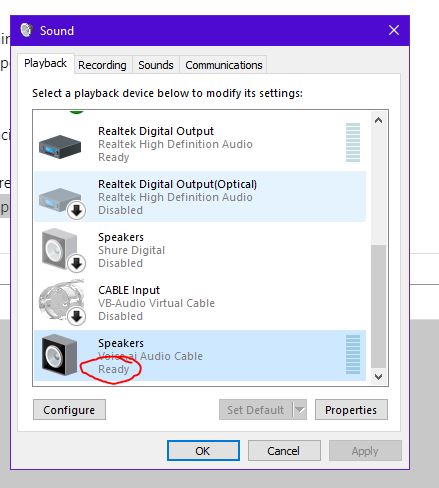 Okay I figured it out, my "VoiceAI Speakers" were disabled in the sound control panel.
Sorry I didn't see that, when first installed this was enabled, after update it was disabled.0 -

I attempted the solution you provided George, it did not work. I checked my internal settings like the report poster did and the output settings are ready and functional. I don't know what else to do as I have gone through every available audio setting on my laptop with no resolve
0
Please sign in to leave a comment.
Comments
4 comments