CPU in 100%, but GPU in 2% in live mode

I start the livemode but it doesn't work, only some noises appear, but no voice. When I look at the task manager, the CPU is at 100%, the GPU in 2% ~ 5%, which I believe is what's causing the program not to work. I have a GTX 1050TI and an i7-3700 with 16GB of RAM. I think if I used the GPU only to run the AI it would work, but oh well, what can you do.
0
-

There are some things you can check:
You are using the GPU not the CPU for the app:
Go into Display settings on Windows -> Graphics, in the app list look for VoiceAI. If it does not show then click on Browse, locate the VoiceAI.exe file and add it. after that click on options and set the dedicated GPU.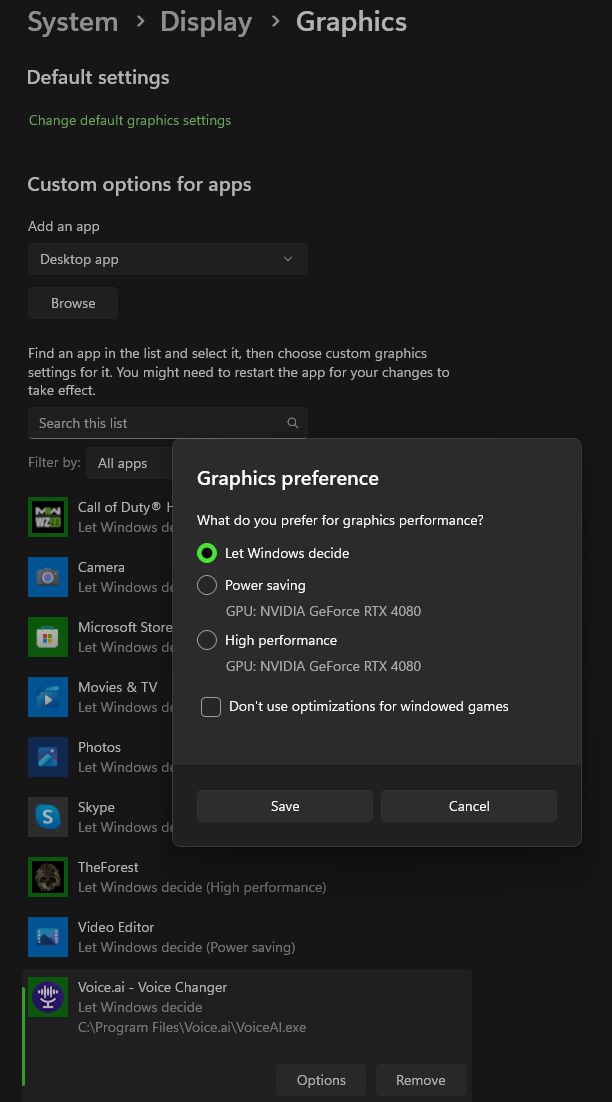 0
0 -

still only takes cpu
-1 -

found a solution ?
1
Please sign in to leave a comment.
Comments
3 comments